Free classroom newsletter template for teachers
A classroom newsletter tells families what their kids are learning and what's coming up. Use the same parts each time: a short hello, what we're learning by subject with one thing to ask at home, dates to remember, reminders, helpers needed, celebrations and how to reach you. Download the free template below, or copy the example text for each part.
Last reviewed October 22, 2026
Get the template
Word file (.docx), about 40 KB. Opens in Google Docs, Microsoft Word and Pages. Free, no email needed.
Class news masthead, four subject boxes, dates to remember, a class photo spot, reminders, a helpers needed box, celebrations and your contact line. Example copy throughout. To use it in Google Docs, choose File, Open, Upload.
The classroom newsletter, part by part
Hello
Dear families, we had a great month. Here's what we're learning, what's coming up, and how you can help at home.
What we're learning
One or two lines per subject, plus one thing families can ask or do at home. That last part is what parents use most.
Reading: We're reading Charlotte's Web and writing our own animal stories. Ask your child who their favorite character is.
Math: We're practicing addition with regrouping. Counting change at the store is great practice.
Science: We're learning how plants grow and planted bean seeds in cups.
Dates to remember
- Oct 24: Picture day retakes
- Oct 31: Costume parade at 9 AM
- Nov 6: Early release at 12:30
- Nov 13: Field trip to the science center. Permission slips due Nov 6.
Reminders
- Please send a water bottle with your child's name on it every day.
- Library books go back every Tuesday.
Helpers needed
We need two parent volunteers for the field trip on November 13. Reply to this email if you can come.
Celebrations and sign-off
Happy birthday to Ava and Leo this month. Thank you to the Kim family for the new classroom books.
Thank you for all you do,
Ms. Carter
Tips for teachers
- Check your school's rules first. Many schools have a policy on which tools teachers can use to email families and on sharing student names and photos. Follow it.
- Photos with care. Use photos of the classroom, projects or the whole group from behind unless families have agreed to photos, and leave out last names.
- Same day each time. Every other Friday, or the first Monday of the month. Families learn to look for it.
- Short and skimmable. Busy parents read on their phones. Dates and asks should be findable in five seconds.
- Plain words. Some families read in a second language. Short sentences help everyone.
Or skip the doc
If you already write a weekly or monthly note to families, MailWild can turn your few lines into a bright, readable newsletter. The Backpack News look below was made for school news, and PTAs use it too (see our PTA and school newsletter page).
With MailWild you tell it your news in a few lines, add your photos or a YouTube link, and it writes the whole newsletter in seconds. You don't start from the doc. Drafts come back in Clean, a plain modern look in your brand color, and one click shows the same draft in Backpack News, the look below, or any other look. Your words and photos stay put. You can also pick a look first and have MailWild fill it in.
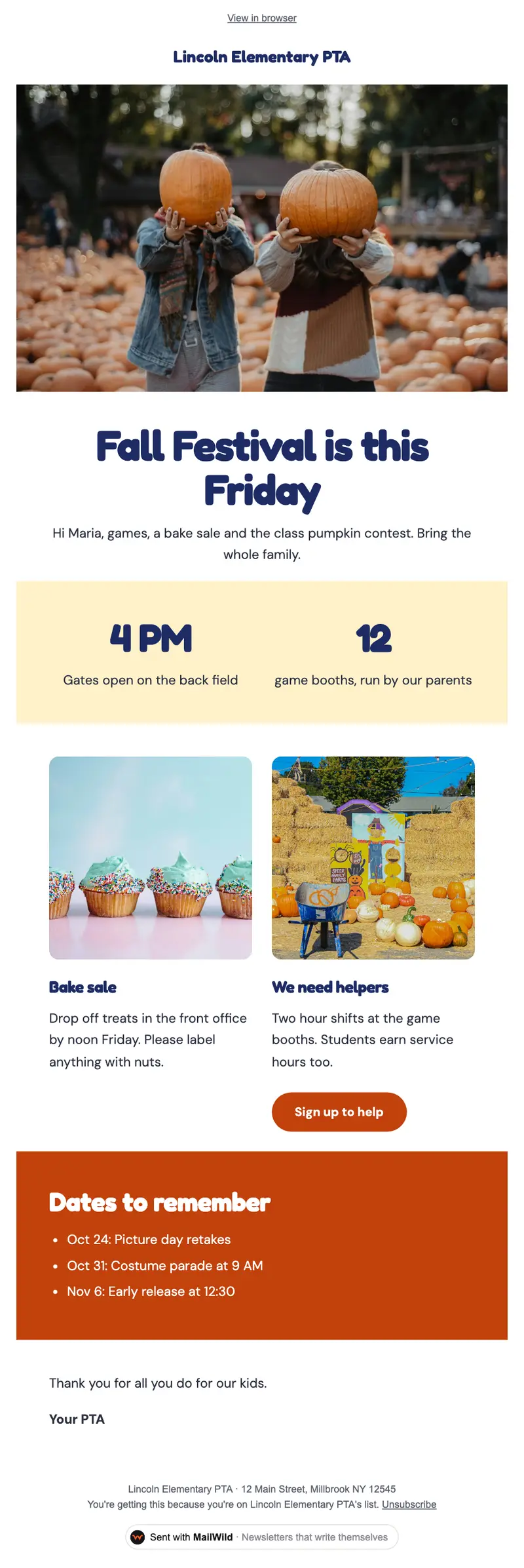
- Edit anything in a simple block editor: photos, buttons, two-column rows and color bands. It looks right on phones automatically.
- Send from your own address at your own domain, signed so inboxes can verify it. Schedule it for later or send a free test to yourself first.
- Unsubscribes are handled. A one-click unsubscribe link and your mailing address are added to every email, and bounced addresses are removed.
- See who opened. Each newsletter shows delivered, opens, clicks and unsubscribes.
- Bring your list. Import a spreadsheet (CSV or Excel) or paste a list of emails. Duplicates and bad addresses are set aside for you.
The templates come with the software. Setting up is free: import your list, write, connect your domain and send yourself tests. You pay when you send to your list, priced by list size, with a 14-day money-back guarantee on the first payment. There is no free plan. See pricing.
Questions
What should a classroom newsletter include?
A short hello, what the class is learning by subject with one thing families can ask or do at home, dates to remember, reminders, helpers needed, celebrations, and how to reach the teacher.
How often should teachers send a classroom newsletter?
Weekly or every other week for younger grades, monthly for older ones. Pick a day and keep it so families know when to look.
Can I put student photos in a classroom newsletter?
Check your school's policy first. Many schools need family permission for student photos. Photos of projects, the classroom or the group from behind are a safe default, and leave out last names.
Is this classroom newsletter template free?
Yes. It's a free Word file that also opens in Google Docs (File, Open, Upload). No signup needed.