Free monthly newsletter template, with example copy
A monthly newsletter works best with the same eight parts every month: a subject line that says what's inside, a two-line hello, the month's big news, a recap of last month, dates to remember, reminders, a spotlight on one person, and one way to help. Download the free template below, or copy the example text for each section.
Last reviewed October 22, 2026
Get the template
Word file (.docx), about 40 KB. Opens in Google Docs, Microsoft Word and Pages. Free, no email needed.
Masthead with month and issue number, big news with a photo, last month's recap, dates and reminders side by side, a member spotlight and a "How you can help" box. Example copy throughout. To use it in Google Docs, choose File, Open, Upload.
The monthly newsletter, section by section
Copy any of these and change the details. They're written for a community group, but the same shape works for a shop, a church, an HOA or a nonprofit.
1. Subject line: say what's inside
November at Maple Street: open house on the 8th, new hours, volunteers needed
2. Hello (two sentences)
Hi everyone, welcome to the November newsletter. Here's what happened last month, what's coming up, and one way you can help.
3. This month's big news
One story, at the top, with a photo. Say what, when and why, then the action.
Our fall open house is Saturday, November 8, from 10 AM to 2 PM. Come see the new space, meet the team and bring a friend. There will be coffee and snacks for everyone.
4. What happened last month
- We welcomed 12 new members.
- The October cleanup day filled 30 bags of litter. Thank you to everyone who came.
- We raised $1,450 for the food pantry.
5. Dates to remember
- Nov 8: Fall open house, 10 AM to 2 PM
- Nov 15: Monthly meeting, 7 PM
- Nov 27: Closed for Thanksgiving
6. Reminders
Dues for the year are due by November 30. Lost and found is cleared on the last Friday of each month.
7. Spotlight
Meet Rosa Diaz. Rosa has volunteered every Saturday since spring and now runs our welcome table. Say hi when you see her.
8. One way to help, then sign off
We need four volunteers for the open house. Reply to this email with the hours you can do.
See you next month,
Dana, volunteer coordinator
At the bottom, add your mailing address and how people can stop getting it.
When to send it, and how to keep it monthly
- Pick one day and keep it. The first Tuesday, or the last Friday before the month starts. People start to expect it.
- Keep a running note. Add news to one doc or note during the month. Writing the issue then takes minutes, not an evening.
- Two minutes to read. If a section runs long, link to the details instead.
- Same order every month. Readers learn where the dates are and skip straight to them.
More on timing in how often to send a newsletter. If monthly is too slow for your news, see the weekly newsletter template.
Ideas for a slow month
- A behind-the-scenes photo and two sentences about it.
- A thank you to one volunteer, customer or teammate, by name.
- The most common question you got this month, answered.
- A look back: this month last year, with a photo.
- A short tip related to what you do.
More by audience: church, HOA, PTA, nonprofit and small business newsletter ideas.
Or skip the doc
Once a month, someone has to sit down, fill in the doc and get it to everyone. That's the part MailWild does for you. It costs at least 25% less than Mailchimp Essentials at every list size we sell.
With MailWild you tell it your news in a few lines, add your photos or a YouTube link, and it writes the whole newsletter in seconds. You don't start from the doc. Drafts come back in Clean, a plain modern look in your brand color, and one click shows the same draft in Neighborhood Notice, the look below, or any other look. Your words and photos stay put. You can also pick a look first and have MailWild fill it in.
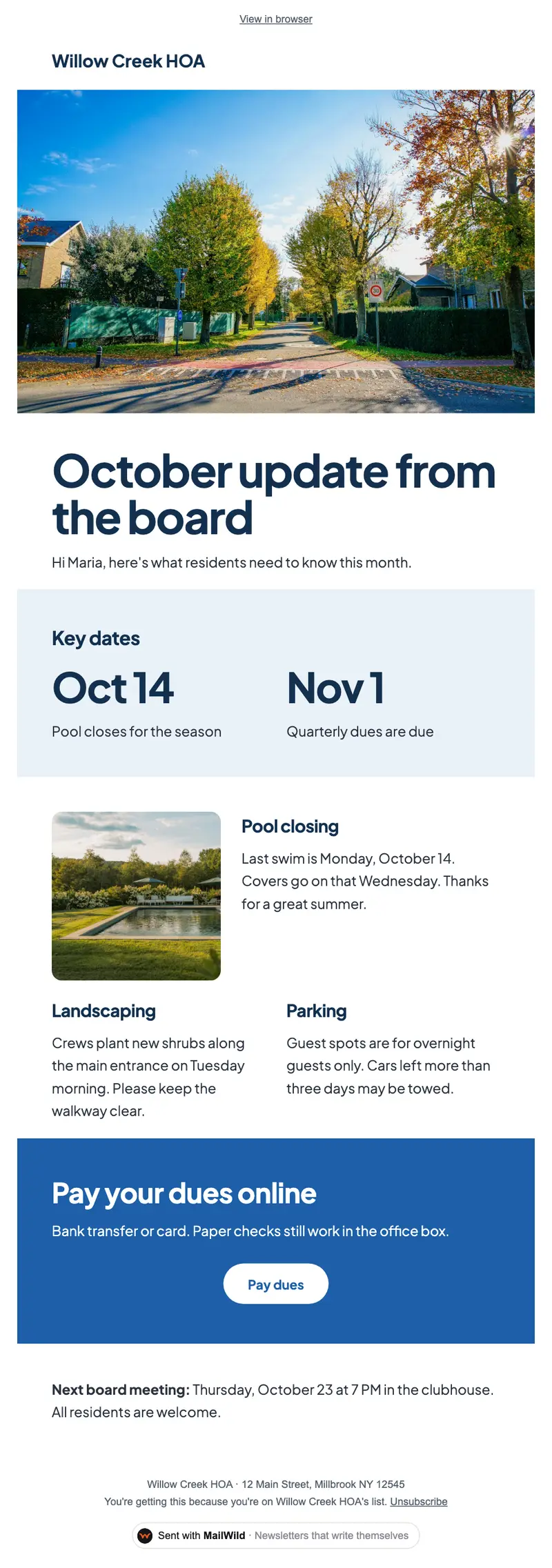
- Edit anything in a simple block editor: photos, buttons, two-column rows and color bands. It looks right on phones automatically.
- Send from your own address at your own domain, signed so inboxes can verify it. Schedule it for later or send a free test to yourself first.
- Unsubscribes are handled. A one-click unsubscribe link and your mailing address are added to every email, and bounced addresses are removed.
- See who opened. Each newsletter shows delivered, opens, clicks and unsubscribes.
- Bring your list. Import a spreadsheet (CSV or Excel) or paste a list of emails. Duplicates and bad addresses are set aside for you.
The templates come with the software. Setting up is free: import your list, write, connect your domain and send yourself tests. You pay when you send to your list, priced by list size, with a 14-day money-back guarantee on the first payment. There is no free plan. See pricing.
Questions
What should be in a monthly newsletter?
A clear subject line, a short hello, the month's big news with a photo, a recap of last month, dates to remember, reminders, a spotlight on one person, and one way to help or act. Keep it readable in about two minutes.
How long should a monthly newsletter be?
Short enough to read in about two minutes: one main story and a handful of short items. Link to details instead of putting everything in the email.
What day should I send a monthly newsletter?
Pick one day and stick to it, such as the first Tuesday of the month, so people know when to expect it. For work audiences a weekday morning is a sensible start; for families and members an evening or weekend morning can work too.
Is this monthly newsletter template free?
Yes. It's a free Word file that also opens in Google Docs (File, Open, Upload). No signup needed.