Company newsletter template for employees
A good company newsletter tells employees what happened, what's coming and who's new, in a few minutes. Use seven parts: a short note from a leader, wins with real numbers, upcoming dates, new teammates, shout-outs, the one thing everyone must do, and where to find things. Download the free template below or copy the example text.
Last reviewed October 22, 2026
Get the template
Word file (.docx), about 40 KB. Opens in Google Docs, Microsoft Word and Pages. Free, no email needed.
Team update masthead, a note from a leader, wins and coming up side by side, a new teammate with a photo, shout-outs, one important box and links to where things live. Example copy throughout. To use it in Google Docs, choose File, Open, Upload.
The employee newsletter, section by section
1. A note from a leader (three or four sentences)
Hi team. It was a busy quarter. We shipped the new order portal, signed 14 new accounts and kept support replies under two hours. Thank you for the work behind those numbers. Here's what's next.
2. Wins, with numbers
- Shipped the new order portal.
- Signed 14 new accounts.
- Support replies under 2 hours on average.
3. Coming up
- Nov 1: Benefits enrollment opens
- Nov 27 and 28: Office closed
- Dec 12: Holiday party
4. Welcome to the team
A photo, a name, a role and one human detail.
Jordan Lee, Operations. Jordan joins us from a logistics company in Ohio and will run the warehouse schedule. Say hello when you see Jordan around.
5. Shout-outs
- Maya in Support stayed late to help a customer recover a lost order.
- The warehouse crew packed a record 2,300 orders in one week.
6. The one thing everyone must do
Benefits enrollment opens November 1. Pick your plans by November 15. Questions go to the HR team.
7. Where to find things
Links to the holiday schedule, policies and who to ask. This saves a lot of "where is that?" messages.
Tips for an internal newsletter people read
- Lead with people, not process. New teammates, shout-outs and photos get read. Policy updates get skimmed, so keep them to one line and a link.
- Use real numbers. "14 new accounts" says more than "a strong quarter".
- One must-do per issue. If everything is urgent, nothing is.
- Monthly or quarterly. Most companies under a few hundred people do well with a monthly update. Pick one and keep it; see the monthly template.
- Assume it gets forwarded. Email can travel. Keep anything confidential out of it and link to an internal page instead.
- Ask for one reply. "Who should we feature next month?" gets you next issue's spotlight.
Or skip the doc
Someone on your team spends an afternoon a month making the update look right in a doc and pasting it into an email. MailWild writes it from a few notes and sends it from your company's own domain.
With MailWild you tell it your news in a few lines, add your photos or a YouTube link, and it writes the whole newsletter in seconds. You don't start from the doc. Drafts come back in Clean, a plain modern look in your brand color, and one click shows the same draft in Team Update, the look below, or any other look. Your words and photos stay put. You can also pick a look first and have MailWild fill it in.
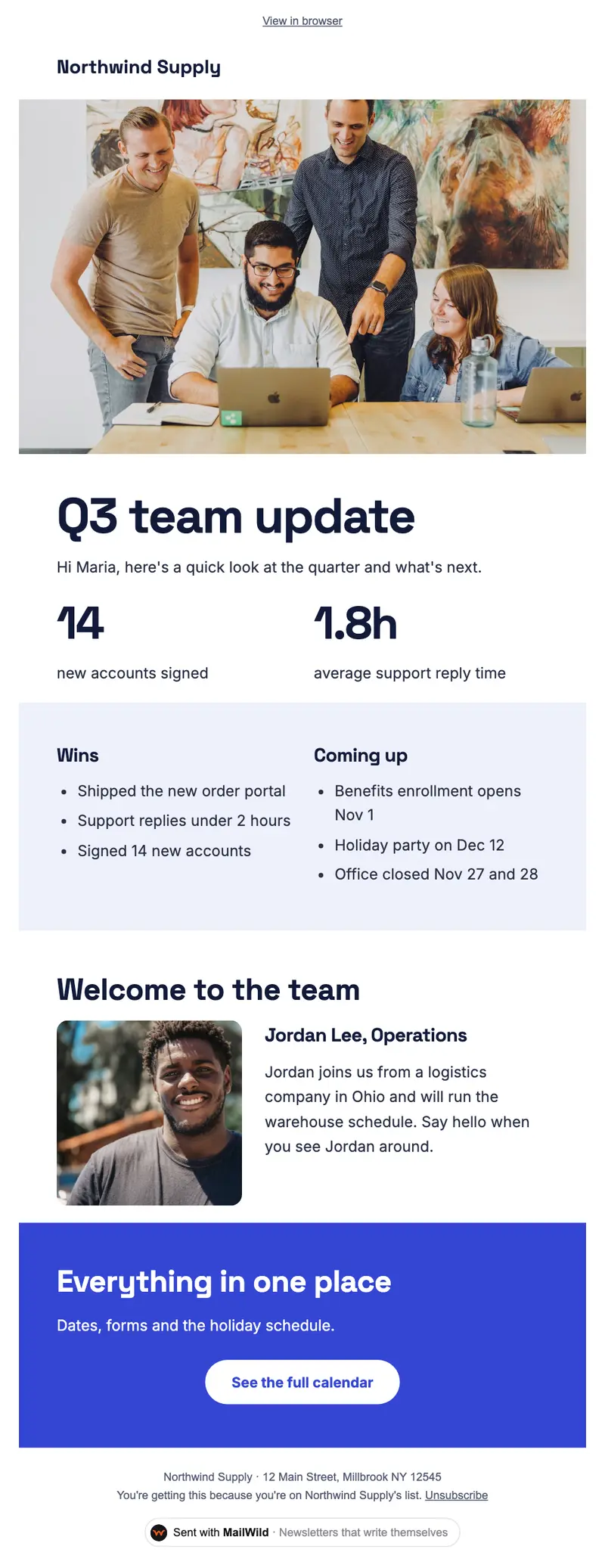
- Edit anything in a simple block editor: photos, buttons, two-column rows and color bands. It looks right on phones automatically.
- Send from your own address at your own domain, signed so inboxes can verify it. Schedule it for later or send a free test to yourself first.
- Unsubscribes are handled. A one-click unsubscribe link and your mailing address are added to every email, and bounced addresses are removed.
- See who opened. Each newsletter shows delivered, opens, clicks and unsubscribes.
- Bring your list. Import a spreadsheet (CSV or Excel) or paste a list of emails. Duplicates and bad addresses are set aside for you.
The templates come with the software. Setting up is free: import your list, write, connect your domain and send yourself tests. You pay when you send to your list, priced by list size, with a 14-day money-back guarantee on the first payment. There is no free plan. See pricing.
Questions
What should be in a company newsletter?
A short note from a leader, wins with real numbers, upcoming dates, new teammates, shout-outs, the one thing everyone needs to do, and links to where things live. Keep it readable in a few minutes.
How often should an employee newsletter go out?
Monthly suits most small and mid-size companies. Quarterly works for slower news, and weekly only if there's real weekly news. Consistency matters more than frequency.
Who should write the company newsletter?
One owner, usually someone in operations, HR or the founder's office, who collects items from each team during the month. A short note from a leader at the top makes it feel personal.
Is this company newsletter template free?
Yes. It's a free Word file that also opens in Google Docs (File, Open, Upload). No signup needed.