Free restaurant newsletter template
A restaurant newsletter should make people hungry and tell them when to come. Use the same parts each time: a short hello from the kitchen, two or three specials with one line and a price each, events, hours and holiday changes, and one way to book. Download the free template below (Word and Google Docs) or copy the example text for each section.
Last reviewed October 22, 2026
Get the template
Word file (.docx), about 40 KB. Opens in Google Docs, Microsoft Word and Pages. Free, no email needed.
Masthead with hours and address, a hello from the kitchen, specials with prices, a dish photo spot, events side by side, hours and holidays, and a booking box. In Google Docs, choose File, Open, Upload.
The restaurant newsletter, section by section
Subject line
This week at Olive & Ember: short rib is back, jazz Thursday
Hello from the kitchen
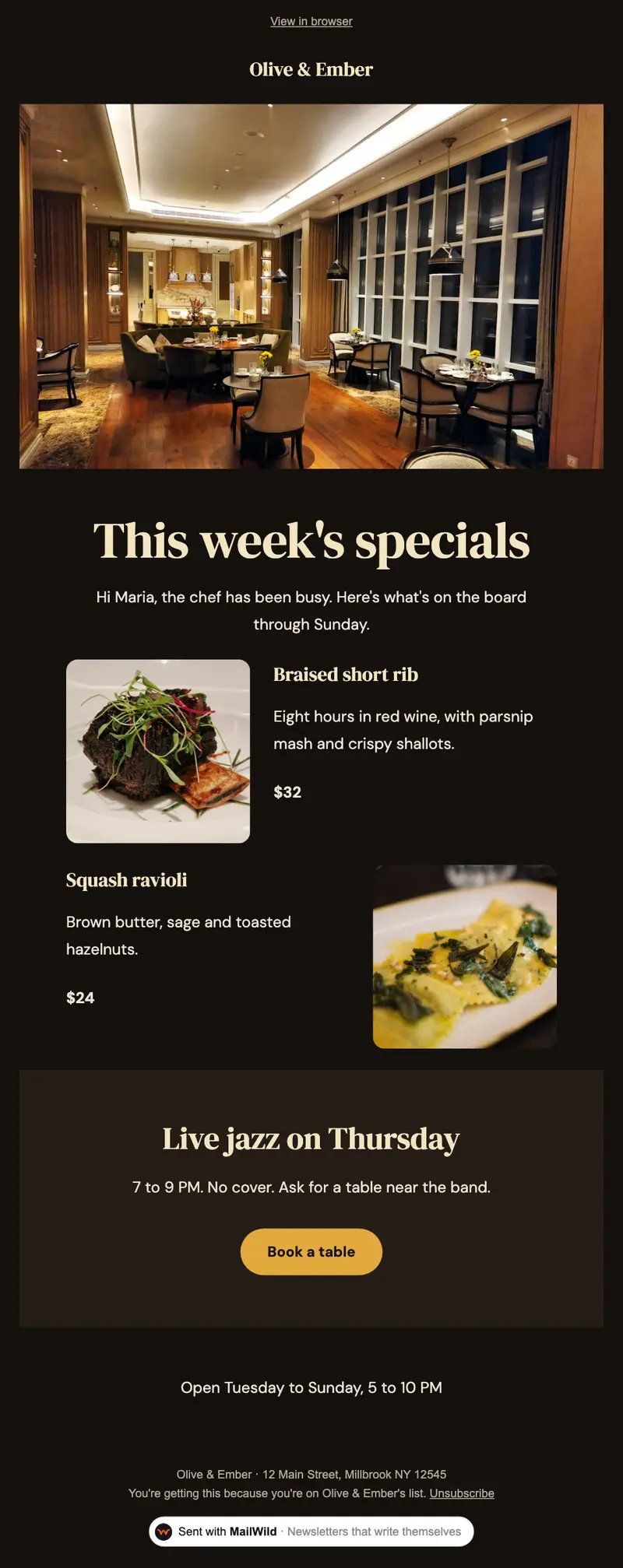
Hi Maria, the chef has been busy. Here's what's on the board through Sunday.
This week's specials
Two or three dishes, one line each, with the price.
- Braised short rib, $32. Eight hours in red wine, with parsnip mash and crispy shallots.
- Squash ravioli, $24. Brown butter, sage and toasted hazelnuts.
- Apple tart, $11. Warm, with vanilla ice cream.
Events
Live jazz
- Thursday, 7 to 9 PM. No cover. Ask for a table near the band.
Wine dinner
- Friday, November 14. Four courses, four wines, $85. Limited seats.
Hours and holidays
- Open: Tuesday to Sunday, 5 to 10 PM
- Thanksgiving: closed
- Holiday parties: private room for up to 30, book by December 1
Book a table
Reserve at [link] or call [phone]. Mention this email for a free dessert this week.
Tips for restaurant newsletters
- Photos of food, taken in daylight. One good dish photo beats five dark ones.
- Send before people plan. Midweek for weekend specials.
- Holiday hours every time they change. It saves your staff a lot of phone calls.
- Only email guests who said yes. More on collecting emails the right way in email newsletters for restaurants.
Or skip the doc
The chef's specials change every week. Tell MailWild what's on the board and it writes the email, in a look like Specials Board below.
With MailWild you tell it your news in a few lines, add your photos or a YouTube link, and it writes the whole newsletter in seconds. You don't start from the doc. Drafts come back in Clean, a plain modern look in your brand color, and one click shows the same draft in Specials Board, the look below, or any other look. Your words and photos stay put. You can also pick a look first and have MailWild fill it in.
- Edit anything in a simple block editor: photos, buttons, two-column rows and color bands. It looks right on phones automatically.
- Send from your own address at your own domain, signed so inboxes can verify it. Schedule it for later or send a free test to yourself first.
- Unsubscribes are handled. A one-click unsubscribe link and your mailing address are added to every email, and bounced addresses are removed.
- See who opened. Each newsletter shows delivered, opens, clicks and unsubscribes.
- Bring your list. Import a spreadsheet (CSV or Excel) or paste a list of emails. Duplicates and bad addresses are set aside for you.
The templates come with the software. Setting up is free: import your list, write, connect your domain and send yourself tests. You pay when you send to your list, priced by list size, with a 14-day money-back guarantee on the first payment. There is no free plan. See pricing.
Questions
What should be in a restaurant newsletter?
A short hello, two or three specials with a line and a price each, events, hours and holiday changes, and one clear way to book a table.
How often should a restaurant send a newsletter?
Weekly if your specials change weekly, otherwise every two weeks or monthly. Send midweek so people can plan the weekend.
How do restaurants collect emails for a newsletter?
Ask with permission: a sign-up form on your website, a line on the receipt or a card at the table. Never add people just because they made a reservation unless they agreed.
Is this restaurant newsletter template free?
Yes. It's a free Word file that also opens in Google Docs (File, Open, Upload). No signup needed.