How to write a newsletter people actually read
To write a newsletter, decide the one thing readers must know or do, and put it first. Write a subject line that says what's inside, a two-sentence hello, the main item with a photo and one action, then two to four short items and how to reach you. Use short sentences and real dates and numbers. Keep it to about two minutes of reading.
Last reviewed October 22, 2026
1. Decide the one thing
Before you write a word, finish this sentence: "If people read nothing else, they should know..." That's your main item. Everything else is supporting news. A newsletter with one clear point gets more action than one with eight equal ones.
2. Write a subject line that says what's inside
People decide to open from the subject line and the sender name. Say what's in it, with the most useful item first. Clever lines get skipped.
Instead of: October Newsletter
Write: October at Grace: fall festival Saturday, new small groups
Instead of: Big things are happening!
Write: We're moving to Main Street on Nov 3
3. Use a simple structure
- A hello, two sentences. Who it's from and what's in it.
- The main item. What, when, where, why it matters, and one action, with a photo if you have one.
- Two to four short items. One heading and one or two sentences each.
- Dates, as a list.
- Something human. A thank you, a photo, a spotlight on one person.
- How to reach you, and at the bottom, your mailing address and how to unsubscribe.
Free templates with this structure: Google Docs, Word, Outlook, Gmail, plus monthly and weekly versions with example copy.
4. Write short, plain and specific
- Short sentences. One idea each. Most people read on a phone.
- Real details. Dates, times, prices and numbers, not "soon" or "many".
- Write to one person. "You", not "members are advised".
- Cut the warm-up. Start each item with the news.
Instead of: We are pleased to announce that, after much consideration, the board has decided that the pool will be closing for the season in the near future.
Write: The pool closes for the season on Monday, October 14.
5. One ask, one button
Every issue should ask for at most one thing: RSVP, sign up, give, book, reply. Put it right after the main item and again at the end if the newsletter is long. Make the button say the action ("RSVP by Friday"), not "Click here".
6. Check it before you send
- Send a test to yourself. Read it on a phone.
- Click every link and button.
- Check every date against a calendar, including the day of the week.
- Make sure names are spelled right.
- Check that the unsubscribe link and your mailing address are at the bottom. See email newsletter rules.
Or tell MailWild your news
Writing is the part most people put off. With MailWild you write the notes and it writes the newsletter, following the same rules: the main item first, short sections, one clear button.
With MailWild you tell it your news in a few lines, add your photos or a YouTube link, and it writes the whole newsletter in seconds. You don't start from a blank page. Drafts come back in Clean, a plain modern look in your brand color, and one click shows the same draft in Shop Talk, the look below, or any other look. Your words and photos stay put. You can also pick a look first and have MailWild fill it in.
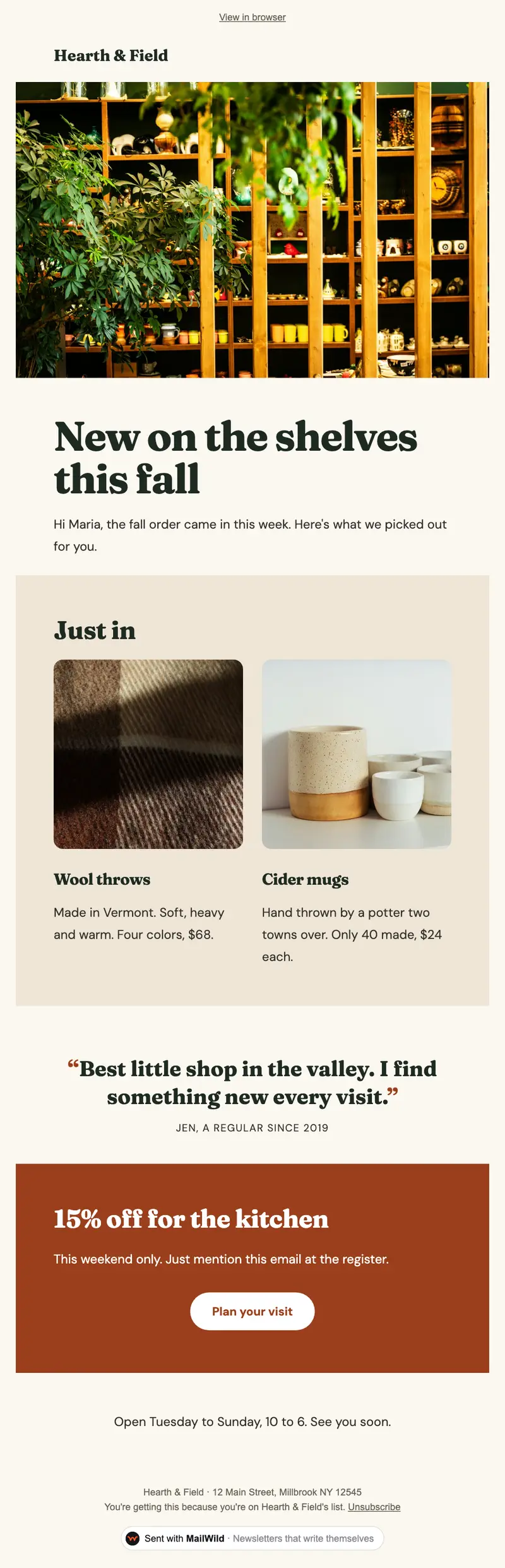
- Edit anything in a simple block editor: photos, buttons, two-column rows and color bands. It looks right on phones automatically.
- Send from your own address at your own domain, signed so inboxes can verify it. Schedule it for later or send a free test to yourself first.
- Unsubscribes are handled. A one-click unsubscribe link and your mailing address are added to every email, and bounced addresses are removed.
- See who opened. Each newsletter shows delivered, opens, clicks and unsubscribes.
- Bring your list. Import a spreadsheet (CSV or Excel) or paste a list of emails. Duplicates and bad addresses are set aside for you.
The templates come with the software. Setting up is free: import your list, write, connect your domain and send yourself tests. You pay when you send to your list, priced by list size, with a 14-day money-back guarantee on the first payment. There is no free plan. See pricing.
Questions
How do you start writing a newsletter?
Decide the one thing readers must know or do, then write the subject line around it. Start the newsletter with a two-sentence hello and put that main item right after it.
How long should a newsletter be?
About two minutes of reading for most small organizations: one main item and two to four short ones. Link to details instead of putting everything in.
What makes a good newsletter subject line?
One that says what's inside, with the most useful item first, such as 'October at Grace: fall festival Saturday, new small groups'. Plain beats clever.
What should every newsletter include?
A clear subject line, the main item with one action, a few short updates, dates, a way to reach you, and at the bottom your mailing address and an unsubscribe link.