Free Outlook newsletter template
Copy the free template below, paste it into a new Outlook email, and save it as a template. In new Outlook and Outlook on the web, choose Mail template, then Save email as template. In classic Outlook, choose File, Save As, and pick Outlook Template. Each issue, open the template, replace the bracketed text and send to your contact list in BCC.
Last reviewed October 22, 2026
Get the template
Click Copy template, then paste into a new Outlook email with Ctrl + V (Cmd + V on a Mac). The headings, bold text, lists and colored boxes come with it. Text in brackets is a spot to type over.
Hi everyone,
Here's what's happening this month. It takes about two minutes to read.
[Your main story headline]
Start with the one thing you most want people to know or do. Say what it is, when it happens and why it matters in three or four short sentences. End with the action: RSVP by Friday, or stop by this weekend.
Coming up
- Oct 14: First event, 7 PM
- Oct 21: Second event, 10 AM
- Nov 1: A deadline or due date
Quick notes
- One short reminder.
- A thank you to a volunteer or customer.
- A change people should know about.
Spotlight
A short story about one person: a member, a customer, a teammate or a volunteer. Two or three sentences.
Put your single most important ask here, with a link: register, donate, book, reply.
How to reach us: [you@yourdomain.com] | [555-123-4567] | [yourwebsite.com]
You're getting this because you signed up for our updates. Reply to this email to stop getting it. [Your mailing address]
Prefer a document? The same layout is in the free Word and Google Docs template.
Save it as an Outlook template
New Outlook for Windows and Outlook on the web
- On the Home ribbon, select New > Mail and paste the template into the message.
- Add a subject if you want one saved, like "[Your Organization] News, [Month]".
- On the Message ribbon, select Mail template > Save email as template.
- To see or edit your saved templates later, open Settings > Mail > Templates.
Classic Outlook for Windows
- Start a new email and paste the template in.
- In the message window, select File > Save As.
- In Save as type, choose Outlook Template, give it a name and select Save.
- To use it, select New Items > More Items > Choose Form, set Look In to User Templates in File System, and open it.
Steps checked against Microsoft's help pages as of October 2026. Menus differ between Outlook versions; if yours looks different, search Microsoft Support for "create email templates in Outlook".
Fill it in and send it
- Open the template and replace everything in brackets. Keep the main story to three or four sentences.
- To add a photo, place the cursor where it goes and use Insert > Pictures.
- To link text, select it and press Ctrl + K (Cmd + K on a Mac).
- Put your contact list in Bcc, never To or Cc, so people can't see each other's addresses. Our guide shows how to make a mailing list in Outlook.
- Send it to yourself first and check it on a phone.
Outlook limits how many people one person can email. As of October 2026, Microsoft lists 500 recipients per message and 5,000 a day for Outlook.com with a Microsoft 365 subscription, with lower limits for free accounts. Work accounts on Microsoft 365 allow up to 1,000 recipients per message (your admin sets the number) and 10,000 a day. There's also no unsubscribe link and no way to see who opened it.
Or skip the Outlook template
An Outlook template is a good start for a small list. Past a few dozen people you want unsubscribes handled, mail that's signed so it reaches the inbox, and a way to see who read it.
With MailWild you tell it your news in a few lines, add your photos or a YouTube link, and it writes the whole newsletter in seconds. You don't start from a pasted template. Drafts come back in Clean, a plain modern look in your brand color, and one click shows the same draft in any of the other 14 looks. Your words and photos stay put. You can also pick a look first and have MailWild fill it in.
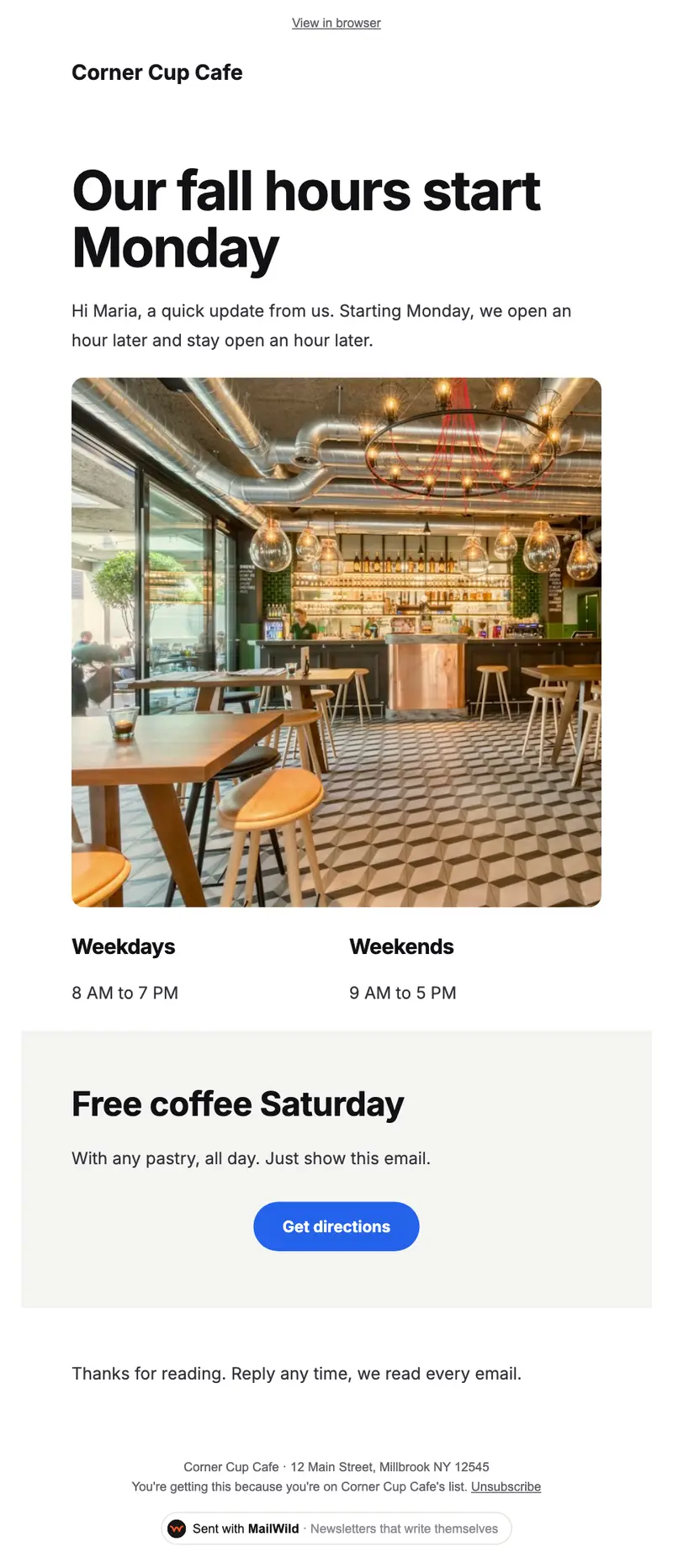
- Edit anything in a simple block editor: photos, buttons, two-column rows and color bands. It looks right on phones automatically.
- Send from your own address at your own domain, signed so inboxes can verify it. Schedule it for later or send a free test to yourself first.
- Unsubscribes are handled. A one-click unsubscribe link and your mailing address are added to every email, and bounced addresses are removed.
- See who opened. Each newsletter shows delivered, opens, clicks and unsubscribes.
- Bring your list. Import a spreadsheet (CSV or Excel) or paste a list of emails. Duplicates and bad addresses are set aside for you.
The templates come with the software. Setting up is free: import your list, write, connect your domain and send yourself tests. You pay when you send to your list, priced by list size, with a 14-day money-back guarantee on the first payment. There is no free plan. See pricing.
Questions
Does Outlook have newsletter templates?
Outlook lets you save any email as a template, but it doesn't come with designed newsletter layouts. Paste the free template on this page into a new email and save it as your own template.
How do I save an email as a template in new Outlook?
In a new email, on the Message ribbon, select Mail template, then Save email as template. Saved templates are under Settings, Mail, Templates. Steps as of October 2026.
How do I save an Outlook template in classic Outlook?
In the message window choose File, Save As, then pick Outlook Template in the Save as type list. Open it later from New Items, More Items, Choose Form, User Templates in File System.
How many people can I email at once from Outlook?
As of October 2026, Microsoft lists 500 recipients per message and 5,000 a day for Outlook.com with Microsoft 365, lower for free accounts, and up to 1,000 per message and 10,000 a day for work accounts, depending on admin settings.